
The prompt behind this case study
Build a Case Studies area for the Marionette website and complete its first article in one task. Follow the website’s existing design and conventions, make routine decisions independently, and preserve unrelated work.

Create /case-studies/ and /case-studies/realworld/. Add appropriate navigation, an index card, and a simple reusable article structure for future studies.

The first article explores:

“What did it take to build a RealWorld application with an AI coding agent and Marionette v5, and how does the finished application compare?”

Write for developers deciding whether to try Marionette. Be concise, concrete, and objective. Lead with the answer. Let the evidence determine the assessment.

Sources

Repository:
https://github.com/marionettejs/marionette-realworld-example-app

Use the benchmarks branch pinned to:
00dc2c8e469f3d62470b1a63a66ff9892eb3fdff

Pinned source:
https://github.com/marionettejs/marionette-realworld-example-app/tree/00dc2c8e469f3d62470b1a63a66ff9892eb3fdff

Inspect it read-only. Start with docs/metrics/README.md, which identifies the final comparison, historical evidence, and verified source mappings. Read the development journal, architecture guide, metrics and benchmark reports, source/visual/loading reviews, and benchmark instructions. Check supporting raw results and manifests where needed.

Use the latest complete five-application comparison in docs/metrics/full-final-run. Do not mix historical measurements into its results. Cite permanent GitHub links near substantive claims.

The three application-development commits are:
- 7ebb8da — implementation
- bbac29f — correctness and ownership refinement
- 48b910a — loading and presentation refinement

Recover the three main development prompts from available records where possible. Label exact quotations and summaries accurately. Do not invent prompt wording, model settings, elapsed time, costs, or intervention counts.

Editorial direction

Aim for 700–900 words of visible article prose, excluding tables, collapsed prompts, and methodology. Every section should answer a useful reader question. Prefer short paragraphs, concrete examples, and descriptive headings.

Use a direct title that identifies the subject. Avoid audit-report language, lengthy process narration, repeated disclaimers, and discussion of private conversations about how this article was commissioned.

Present the development as three stages. Explain what each requested, produced, and improved. Do not imply three uninterrupted model responses or use commit count as an effort measurement. Mention follow-up work briefly if needed for accuracy; do not make history editing a central story.

Distinguish changes in requested scope from implementation defects where relevant. Avoid assigning blame or defending either the human or agent.

Article structure

1. Opening conclusion
Give readers the practical finding in the first paragraph: what was built, how the resulting application compares, and what this suggests about trying Marionette. Include the central limitation that this was not a matched agent-development experiment across frameworks.

2. Three development stages
Briefly explain implementation, correctness/ownership refinement, and loading/presentation refinement. Use two or three concrete examples such as retaining drafts, rejecting obsolete session responses, and overlapping independent requests.

Include the original development prompts in collapsed disclosures where recoverable. Keep their supporting detail out of the main narrative.

3. The finished application
Show selected existing desktop/mobile application screenshots. Use them to demonstrate the result or explain a meaningful refinement. Preserve their aspect ratios and identify the represented state.

4. Measured comparison
Use compact tables or charts comparing Marionette, Vue, React FSD, Angular, and SvelteKit. Cover authored source size, initial JavaScript gzip, feed/navigation readiness, and bounded memory behavior.

Prioritize the metrics that help a developer make a decision. State units and sample counts. Include variability where useful without overwhelming the main tables.

Explain the findings in plain language. Give alternatives’ favorable results equal clarity. Avoid a composite score or universal winner.

Keep relevant qualifications beside the affected comparison: these are selected implementations with incomplete parity checks; SvelteKit uses SSR with different network topology; timings came from sequential runs on a shared machine. Do not repeat those qualifications throughout the article.

Distinguish initial payload from total output, content readiness from interactivity, and heap growth from evidence of a leak. Distinguish unique test cases from executions across browsers.

5. Assessment
Give a conditional recommendation grounded in this project. Discuss where Marionette’s explicit ownership, retained state, and lifecycle conventions may be useful, along with responsibilities the application still has to manage.

Separate measured results from source observations and hypotheses. Do not claim that runtime performance proves agent-development superiority. Briefly identify what a matched development experiment would need to measure.

6. Evidence and methodology
Put detailed source identity, environment, workload, reproduction links, verification boundaries, and remaining unknowns in a compact collapsed section. Use the repository’s evidence guide for snapshot provenance rather than reconstructing it in the main article.

Disclose that the Marionette project publishes this study. Preserve evidence accuracy without turning the article into a provenance report.

Images and prompt disclosure

Use this existing image for the hero and social/share image:
 /Users/paulfalgout/Documents/Marionette Marketing/marionette-development-progression.png

Copy it into website assets. Preserve its full composition and readable labels; use padding where share-image dimensions require adaptation. Add appropriate alt text and metadata.

Treat the image as an editorial illustration. Do not infer financial savings from it or add a conspicuous disclaimer about its dollar signs.

At the top of the article, add a disclosure collapsed by default titled “The prompt behind this case study,” matching existing website disclosures. Include this entire prompt verbatim. No copy button is needed.

Completion

Finish the index, article, screenshots, hero/share assets, navigation, and metadata in this task.

Verify applicable website checks, source links, keyboard-accessible disclosures, and desktop/mobile presentation. Review the finished article for repetition, unsupported claims, and whether a reader can reach the conclusion quickly.

Report what changed, what checks actually ran, and any material evidence gaps. Leave the completed changes ready for review; do not deploy.
01 / REALWORLD
Building RealWorld with an AI agent and Marionette v5
An AI coding agent built a Conduit frontend with Marionette v5 RC2, covering authentication, feeds, articles, comments, profiles, and editing. After correctness and presentation refinements, it was competitive with the selected client applications in the measured payload and navigation workloads; SvelteKit was smaller and faster to show the feed. This makes Marionette worth trying on a representative feature, but this was not a matched agent-development experiment across frameworks. See the measured comparison. View the example repository.
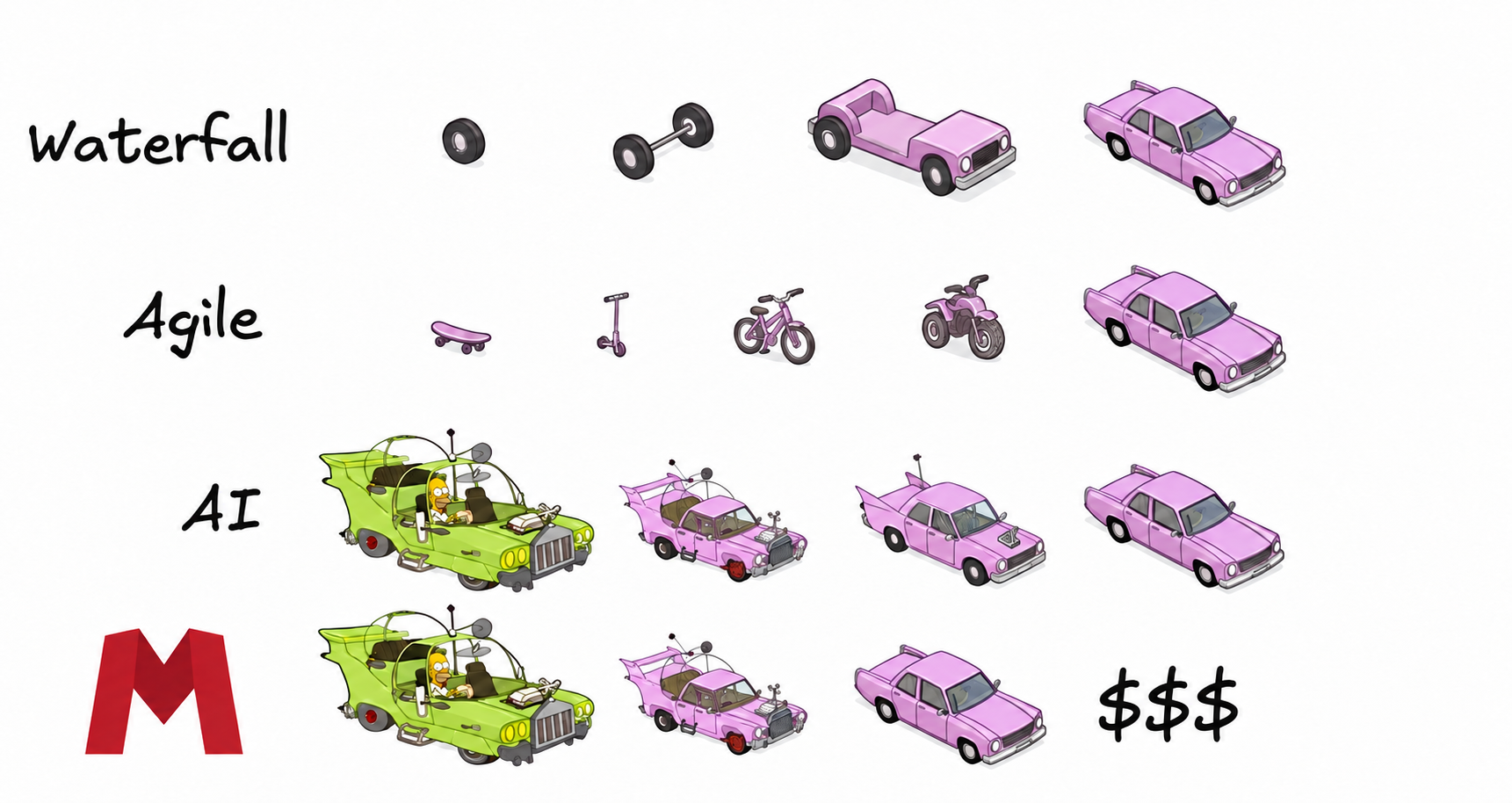
What did the agent need to do?
The work falls into three stages, represented by three application commits. Reviews and follow-up requests contributed to them; these were not three uninterrupted model responses, and commit count does not measure effort.
1. Implement the application
The initial request paired the framework-neutral RealWorld specification with the installed RC2 documentation. It produced named feature Applications, Views and Regions, explicit HTTP transport, and browser journeys. The root owned navigation and session; features owned requests and child lifetimes. That gave later changes identifiable places to land. Implementation commit · Architecture
Stage 1 · Original implementation prompt
Exact quotation recovered from the development chat.
Use the `marionette:marionette` plugin to build a complete RealWorld/Conduit example application in this project from the base starter.
Use published Marionette `5.0.0-rc.2` and matching RC2 companion packages where needed. Verify installed versions and use their packaged documentation and tools as the authoritative contracts.
The application should teach idiomatic Marionette v5 architecture. Let the RC2 architecture guides and composed examples inform the design. Implement the complete framework-neutral RealWorld specification and markup, including authentication, feeds, tags, articles, profiles, comments, editor, and settings.
Keep a concise, contemporaneous development journal in `docs/development-journal.md`. Record the documentation and examples consulted, significant architectural decisions and their rationale, assumptions, changes made, checks performed and their results, and problems encountered. Link decisions to relevant documentation and source files. When an approach changes, preserve the original decision and explain what evidence prompted the revision. Distinguish verified facts from assumptions. Record useful decision summaries, not private internal reasoning.
Inspect the project before changing it and preserve unrelated user work. Verify installation, build, lint, types, meaningful browser journeys, and lifecycle cleanup. Review architectural clarity separately from functional test results. Report actual test evidence and any remaining limitations.
Leave usable local files and clear run instructions. Do not publish, push, deploy, or use real credentials.
2. Tighten correctness and ownership
Review exposed real defects: same-user session verification could discard a draft, and a delayed save could overwrite newer credentials. Refinement retained the current page when identity remained valid and rejected completions from obsolete sessions. Named Auth, Editor, and Settings Views also replaced a conditional form abstraction. That split was a teaching and organization request, distinct from fixing the races. Refinement commit
Stage 2 · Original refinement instructions
Exact quotations: the request following the review, then its file-organization follow-up. The preceding review supplied the bug context.
async means application is *generally* true, but some async things can be done from a view's model.. but don't over do that.. we definitely need to fix the bugs.. but absolutely whatever we can do to tighten up the implementation.. one note.. you chose extend Application and View\.extend which is fine, but we should add a note as to why.. it's a little funny to use both in my opinion, but it's not necessarily wrong.. but we should probably note somewhere why that choice was made over choosing one or the other.. or maybe we should choose one or the other.. possibly extends View? app-frontend already does the .extend example.. but I'm ok either either if there's good reasoning
also one other thing to consider: Refactor file organization to make this Marionette teaching example easier to navigate. Give Auth, Editor, and Settings their own Application and View files, replacing the universal conditional FormView with feature-specific Views. Separate Feed, Article, and Comments Applications from their presentation Views; keep small related Views together.
Organize files by feature, preserve behavior and lifecycle ownership, and avoid new generic abstractions. The goal is to make each workflow’s coordination and presentation easy to find and understand. Update architecture docs and the development journal, then run the existing checks.
3. Refine loading and presentation
The next request targeted demonstrated sequential work. Feed and tags, article and comments, and profile and feed could load concurrently under their existing owners. Follow-ups aligned markup and loading states with RealWorld: retained feed rows stay hidden while a replacement query loads, then return with Retry on failure. A bounded cleanup removed boilerplate without removing safeguards. Loading and presentation commit · Loading review
Stage 3 · Original performance prompt and presentation follow-ups
Exact quotations recovered from the development chat. These separate requests contributed to the third stage; they are not a single prompt.
Concurrent loading
Review and improve avoidable performance costs in the current Marionette v5 RC2 RealWorld implementation, using the installed version-matched docs.

Start with tags blocking feed loading and article loading blocking comments. Request independent data concurrently while preserving clear ownership, cancellation, cleanup, and existing error behavior. Also inspect for duplicate requests, unnecessary rendering or Markdown parsing, and other unjustified sequential work. Change only demonstrated inefficiencies.

Keep this a faithful RealWorld example: preserve the unchanged specification, acceptance tests, required features, starter markup, appearance, and expected behavior. Consult reference implementations where expectations are ambiguous. Do not add UX, caching, prefetching, lazy loading, abstractions, or resilience policies merely to improve benchmark numbers. Do not alter the benchmark workload.

Preserve unrelated user changes. Run appropriate correctness checks, then rerun only Marionette with the existing shared benchmark harness. Keep the other libraries’ results unchanged and update the comparison with the new Marionette snapshot and evidence.

Report the changes, measured effects, and remaining limitations. Make one commit containing only this task’s changes. Do not push or publish.
Presentation fidelity
Review docs/visual-comparison.md and its screenshot evidence, then fix Marionette-specific visual deviations from the standard RealWorld markup and theme.

Focus on the oversized profile heading, article-tag placement/spacing, extra editor heading/help text, and authenticated mobile navigation wrapping. Confirm each change against the framework-neutral templates and reference implementations; the references differ, so do not blindly copy one app or pursue pixel identity everywhere.

Preserve required features, behavior, accessibility, and idiomatic Marionette v5 RC2 ownership. Do not add styling, UX, abstractions, or polish beyond the base RealWorld example. Preserve unrelated work, including concurrent performance changes.

Rebuild the current implementation and repeat the affected desktop/mobile visual checks using the existing harness and fixtures. Inspect the screenshots, run appropriate correctness checks, and update the visual report with the final snapshot, results, and remaining differences. Do not rerun performance benchmarks for presentation-only changes.

Amend the previous commit as if these fixes were included with the last group. Do not push or publish.
Feed loading and cleanup
Review the current Marionette v5 RC2 RealWorld implementation for loading-state fidelity and bounded code cleanup. Use the installed version-matched docs and framework-neutral RealWorld markup.

Fix feed loading presentation: match the base loading block’s spacing and hide previous rows/pagination while the new query loads, as Vue and Angular do. Preserve request cancellation, error handling, and idiomatic Marionette ownership. Do not copy Angular-specific branding, signup styling, or footer policies.

Inspect these cleanup candidates:
- Repeated action handling across Article, Profile, Comments, and forms.
- Redundant typed state access, casts, or bookkeeping.
- Unused state or orchestration for scenarios the app does not expose.
- Template helpers that obscure markup without meaningful benefit.

Change only demonstrated redundancy. Preserve clear feature boundaries, drafts, all required behavior, and unrelated user changes. Do not introduce a generic action framework, universal form schema, new UX, or abstractions merely to reduce lines. No LOC target; keep the single JS bundle.

Run appropriate correctness checks and inspect loading/success/failure states at desktop and mobile sizes. Update relevant documentation and source counts. If runtime code changes, rerun only Marionette’s existing shared benchmarks and update the comparison; preserve other libraries’ results and the workload.

Report what changed, what candidates were left alone and why, test evidence, and the LOC difference. Amend the current commit with only this task’s changes, preserving its existing contents. Do not push or publish.
What does the result look like?
The familiar Conduit interface remains the target. These desktop and mobile captures show the populated home feed at both widths. Screenshot and interaction evidence
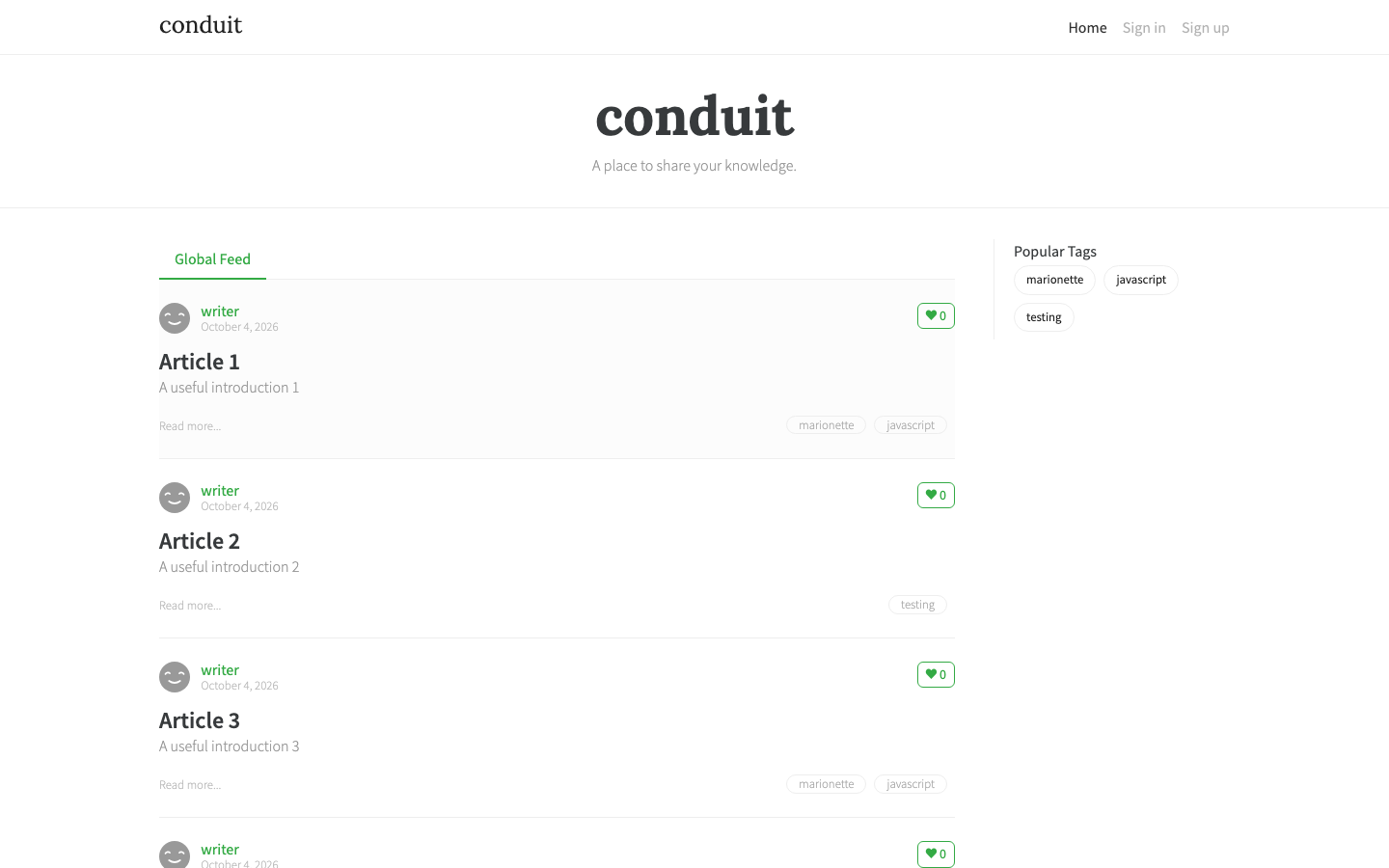

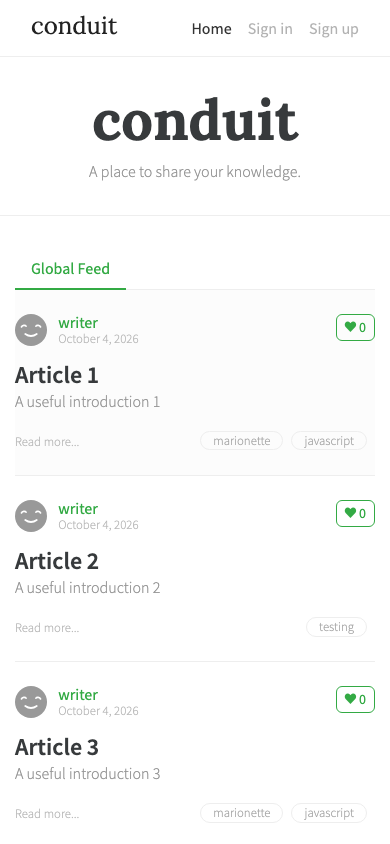

The final checks recorded 33 development browser cases executed across three engines: 99 executions, plus 19 production Chromium journeys and three unit tests. Those fixture-based checks cover more than the anonymous benchmark, but do not establish full upstream or live-backend acceptance. Verification record
How does it compare?
Only the complete five-application run is used below. These are selected implementations with incomplete parity checks, not isolated framework rankings. Source counts include comments and embedded styles; they exclude tests, configuration, dependencies, and standalone styles. Formatting also affects line counts. Counting rules
| Application | Authored files | Nonblank lines | Initial JS gzip KiB |
|---|---|---|---|
| Marionette | 29 | 2,497 | 55.6 |
| Vue | 32 | 1,913 | 49.3 |
| React FSD | 63 | 2,633 | 111.1 |
| Angular | 53 | 2,210 | 98.4 |
| SvelteKit | 41 | 1,153 | 44.0 |
Marionette has fewer authored files, but more lines than Vue or Angular. Vue delivers less initial JavaScript. SvelteKit is smallest on both lines and initial scripts. React’s separate 45 generated API/schema files add 2,753 physical lines; generated runtime still contributes to its bundles. Initial payload is what the home route requests, not all-route output: Vue’s total browser JavaScript is 79.9 KiB gzip versus 49.3 initially.
| Application | Feed desktop / mobile | Article desktop / mobile | Home return desktop / mobile |
|---|---|---|---|
| Marionette | 141 / 793 | 73 / 175 | 80 / 143 |
| Vue | 141 / 832 | 83 / 425 | 77 / 140 |
| React FSD | 408 / 1,404 | 335 / 458 | 331 / 345 |
| Angular | 176 / 1,292 | 101 / 637 | 80 / 163 |
| SvelteKit | 139 / 590 | 79 / 158 | 81 / 136 |
Ten measured samples per app per profile; two warmups discarded. “Mobile” simulates constraints in desktop Chromium. Feed readiness checks 20 previews, tags, and two animation frames; it is not time to interactive. Final summary · Raw samples
Marionette and Vue are effectively level on desktop feed readiness. Marionette’s mobile article navigation is faster here; Vue’s return home is slightly quicker. SvelteKit has the fastest feed and mobile navigation, with SSR and server-local API calls that avoid simulated client latency. Its server costs are unmeasured. Runs were sequential on a shared machine, so small gaps deserve caution.
Timing spread · constrained mobile feed
| Application | Feed readiness range |
|---|---|
| Marionette | 766–900 |
| Vue | 818–843 |
| React FSD | 1,387–1,457 |
| Angular | 1,252–1,314 |
| SvelteKit | 561–804 |
Ranges use only measured samples from the final run; they are not confidence intervals.
| Application | Heap MiB baseline → end | Growth KiB | Last 50 cycles growth KiB |
|---|---|---|---|
| Marionette | 3.22 → 4.09 | 895 | 53 |
| Vue | 4.47 → 5.35 | 899 | 51 |
| React FSD | 4.19 → 5.31 | 1,153 | 108 |
| Angular | 5.91 → 7.16 | 1,282 | 191 |
| SvelteKit | 2.59 → 3.41 | 838 | 54 |
Marionette finishes with less browser heap than Vue, React FSD, and Angular; SvelteKit uses less again. All five show zero DOM-node growth and 13 additional listeners. Late heap growth is smaller than total growth. These bounded, garbage-collected trials neither prove a leak nor establish leak-free operation; native DOM and server memory are excluded. Memory method
Is Marionette worth trying?
Try it on a feature with nested screens, local drafts, and asynchronous work that must stop when its owner leaves. This project shows how explicit ownership and retained state can make those responsibilities inspectable. That is a source observation; easier future agent edits remain a hypothesis. Source review
The application still defines credential authority, read/write ordering, draft comparisons, and cleanup for its own resources. Lifecycle conventions give those decisions a home. Runtime results do not prove superior agent development: a matched experiment would need equal requirements, agent settings and budgets, repeated runs, and measurements of time, interventions, defects, and maintenance effort.
Evidence and methodology
This study is published by the Marionette project. All comparison measurements come from docs/metrics/full-final-run, recorded 2026-10-04T15:01:32.910Z (October 5, 2026, 00:01 Asia/Seoul), at evidence snapshot 00dc2c8. The evidence guide maps recorded source snapshots to the three application commits; it establishes source equivalence, not rebuilt artifact identity.
Marionette and companion packages: 5.0.0-rc.2, with Lit rendering. Final build/source manifest and reference revisions, runtime versions and source counts preserve exact identities. Reference artifacts were reused, not rebuilt for the final run. The saved npm locks and patches describe preparation; a second clean installation replay remains unverified.
Environment: Apple M2 Pro, macOS ARM64, 16 GiB RAM; Node 24.19.0; Chromium 153.0.8010.12. Desktop: 1440 × 900, unthrottled. Constrained mobile: 390 × 844, 4× CPU slowdown, 80 ms client latency, 1.6 Mbit/s down and 0.75 Mbit/s up. Fixed app order; fresh contexts, disabled browser cache, blocked service workers and external fonts/icons, shared local avatar.
Workload: read-only local HTTP API, 40 ms GET delay, 20 feed summaries, two tags, 200 total articles, one article with 20 plain-text paragraphs and ten comments. Home limits and API addresses were normalized. Four client SPAs use a shared gzip server; SvelteKit uses production preview with SSR. React renders the fixture article in a paragraph while the others process Markdown. Complete semantic and presentation parity was not audited.
There are 100 measured timing samples, 20 discarded warmups, and 15 memory trials overall. Navigation uses synthetic clicks after modules settle, excluding hover prefetch and physical pointer/actionability overhead. Memory trials have ten warmup cycles, then 100 home/article/home cycles, with two garbage collections at checkpoints. Payloads cover JavaScript recompressed at gzip level 9, excluding HTML, CSS, images, headers and server output.
Screenshots are preserved loading-review captures, identified by their own manifest and source patch; they precede the final bounded code cleanup. They illustrate the retained loading presentation, not additional timing samples. The visual review records other presentation refinements and remaining differences.
Prompts are exact user-message transcriptions recovered from the original development chat, including follow-ups where labeled. The repository’s development journal supplies implementation context, not proof of original wording. Model settings, elapsed development time, cost, and total intervention count are not established here.
Development browser log · Production journey log · Unit log. No full upstream acceptance, live-backend interoperability, formal accessibility certification, or long-running production memory claim follows from these checks.
To reproduce, use the benchmark instructions with the pinned manifests and a fresh output directory. The complete report includes all-route output, browser work, adaptations and remaining limits.